> ## Documentation Index
> Fetch the complete documentation index at: https://docs.postonce.to/llms.txt
> Use this file to discover all available pages before exploring further.
# Create and schedule a post
> Write one post in PostOnce and publish it to Instagram, TikTok, YouTube, Facebook, LinkedIn, X and more, now or at a scheduled time, with a different caption for each account.
Use **Create Post** when you want to write a post in PostOnce instead of copying one from a source account.
Open [Posts › Create](https://postonce.to/dashboard/posts/create).
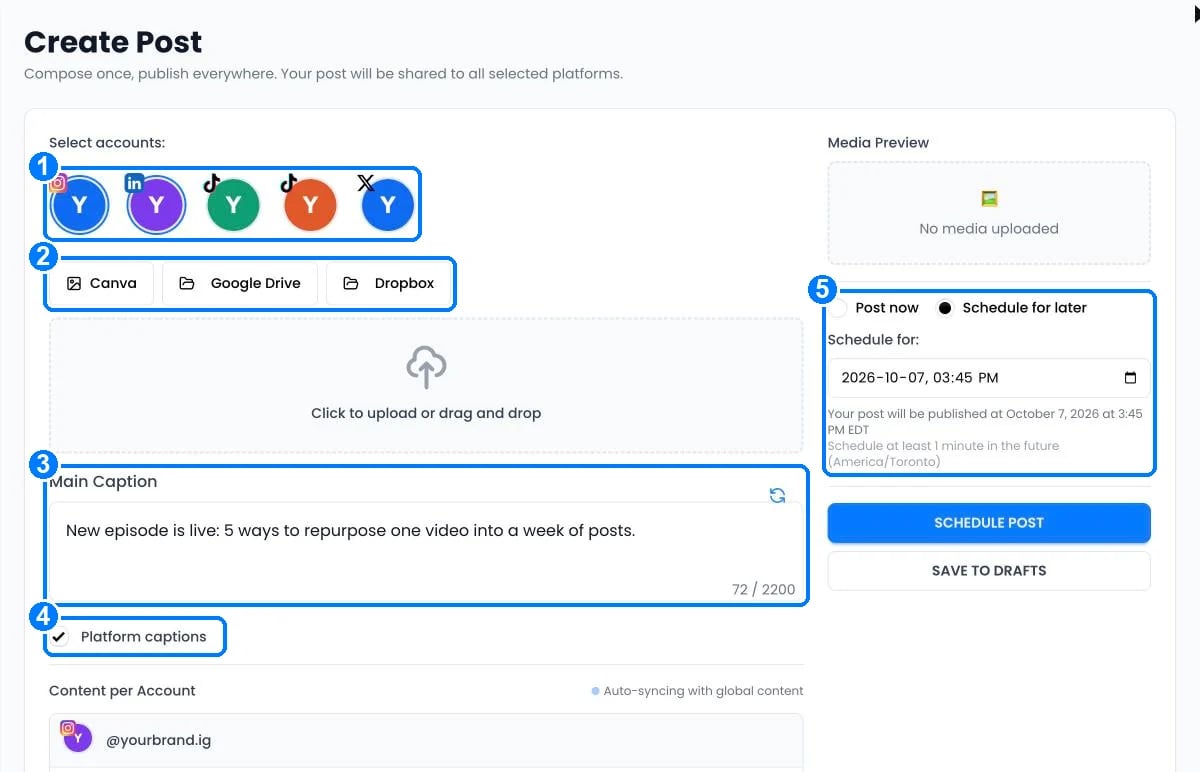 Click each account that should receive the post (1).
Drag in images or videos, or import an image from Google Drive or Dropbox (2). See [Import images](/help/import-media).
Write one caption for every account (3). The counter shows the limit of the strictest platform you selected. When TikTok is selected, this box is the post **Title**.
With two or more accounts selected, tick **Platform captions** (4) to edit the text for each account. Accounts you don't edit keep following the main caption.
Choose **Post now**, or **Schedule for later** and pick a date and time in your timezone (5). Click **Post now** or **Schedule post**. To finish later, click **Save to drafts**.
## Platform options
Extra fields appear when you select these platforms:
* **TikTok**: delivery (post directly or send as draft), privacy, comments, Duet, Stitch and content disclosure. See [TikTok](/help/platforms/tiktok#tiktok-options-when-you-create-a-post).
* **YouTube**: title (up to 100 characters) and privacy: public, unlisted or private.
* **Pinterest**: board, description and destination link.
Check [Platforms at a glance](/help/platform-rules) for the media each platform accepts.
To protect your accounts, **Post now** allows up to 5 posts in a row and 10 per hour, then waits a few minutes. Scheduled posts are not affected.
## After you publish
* See every post and its result on [Posts › Published](https://postonce.to/dashboard/posts/published).
* Change or cancel scheduled posts on [Posts › Scheduled](https://postonce.to/dashboard/posts/scheduled). See [Manage scheduled posts](/help/manage-scheduled-posts).
* Get an email when a post fails under **Settings › Email notifications**.
## Still stuck?
Search this help center with ⌘ K, or email [support@postonce.to](mailto:support@postonce.to) from the address you use for PostOnce. Include the platform, the approximate time, and the exact message you saw. Never send passwords, access tokens, API keys, or card details.
Something missing from PostOnce? [Request a feature](https://postonce.featurebase.app/) or check the [roadmap](https://postonce.featurebase.app/roadmap).
This documentation is built and hosted on [Mintlify](https://mintlify.com), a developer documentation platform.
Click each account that should receive the post (1).
Drag in images or videos, or import an image from Google Drive or Dropbox (2). See [Import images](/help/import-media).
Write one caption for every account (3). The counter shows the limit of the strictest platform you selected. When TikTok is selected, this box is the post **Title**.
With two or more accounts selected, tick **Platform captions** (4) to edit the text for each account. Accounts you don't edit keep following the main caption.
Choose **Post now**, or **Schedule for later** and pick a date and time in your timezone (5). Click **Post now** or **Schedule post**. To finish later, click **Save to drafts**.
## Platform options
Extra fields appear when you select these platforms:
* **TikTok**: delivery (post directly or send as draft), privacy, comments, Duet, Stitch and content disclosure. See [TikTok](/help/platforms/tiktok#tiktok-options-when-you-create-a-post).
* **YouTube**: title (up to 100 characters) and privacy: public, unlisted or private.
* **Pinterest**: board, description and destination link.
Check [Platforms at a glance](/help/platform-rules) for the media each platform accepts.
To protect your accounts, **Post now** allows up to 5 posts in a row and 10 per hour, then waits a few minutes. Scheduled posts are not affected.
## After you publish
* See every post and its result on [Posts › Published](https://postonce.to/dashboard/posts/published).
* Change or cancel scheduled posts on [Posts › Scheduled](https://postonce.to/dashboard/posts/scheduled). See [Manage scheduled posts](/help/manage-scheduled-posts).
* Get an email when a post fails under **Settings › Email notifications**.
## Still stuck?
Search this help center with ⌘ K, or email [support@postonce.to](mailto:support@postonce.to) from the address you use for PostOnce. Include the platform, the approximate time, and the exact message you saw. Never send passwords, access tokens, API keys, or card details.
Something missing from PostOnce? [Request a feature](https://postonce.featurebase.app/) or check the [roadmap](https://postonce.featurebase.app/roadmap).
This documentation is built and hosted on [Mintlify](https://mintlify.com), a developer documentation platform.