> ## Documentation Index
> Fetch the complete documentation index at: https://docs.postonce.to/llms.txt
> Use this file to discover all available pages before exploring further.
# Filters, duplicates and video quality
> Choose which posts a PostOnce workflow copies: hashtag and keyword filters, content types, skipping low-quality videos, skipping duplicate videos, and running a full history sync.
A workflow copies every supported post from its source unless you tell it otherwise. Set this under the workflow's **Settings › Source**.
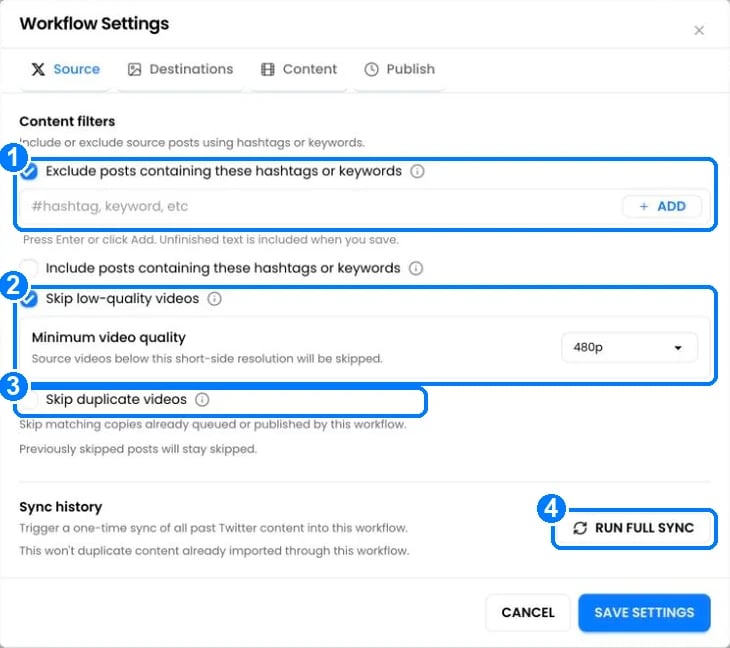 1. **Exclude** or **include posts containing these hashtags or keywords**: type a word or hashtag and click **Add**. Example: exclude `#personal`, or include only `#podcast`.
2. **Skip low-quality videos**: skips Instagram videos below the **Minimum video quality** you choose (360p, 480p, 720p or 1080p). Useful when reposting old Instagram videos, which Instagram often stores at low quality.
3. **Skip duplicate videos**: skips a video that this workflow already queued or published. It matches by caption and video length, and keeps the best-quality copy when it can. Posts you scheduled yourself are never skipped.
4. **Run full sync**: imports all past posts from the source that the workflow hasn't seen. Nothing is imported twice.
## Content types
The **Content to include** options choose which kinds of posts are copied. Defaults:
| Source | Included by default | Off by default |
| - | - | - |
| Instagram | Photos & carousels, Reels | Trial Reels, Stories |
| YouTube | Shorts | Regular videos |
| Facebook | Posts | Stories |
| TikTok | Photos, Videos | |
| X, Threads, Bluesky, LinkedIn | Images, Videos, Text, Quote posts | |
Change them when you create the workflow, or under **Settings › Source**.
## Skipped posts
A skipped post shows the reason in the workflow, for example "Skipped: possible duplicate video." or "Skipped: Instagram quality is 360p. Requires 480p+." To publish it anyway, click **Add back** or **Allow repeat** on the post.
PostOnce also skips posts automatically when:
* The destination can't accept them, like a text-only post to Instagram.
* The original was deleted or made private before it was copied.
* PostOnce published the post itself, so it's never copied back to where it came from.
## Questions
Two videos with the same first 8 words of caption and almost the same length are treated as copies. Click **Allow repeat** on the post, or turn off **Skip duplicate videos**.
It checks Instagram source videos. Other platforms are always downloaded at the best quality available.
## Still stuck?
Search this help center with ⌘ K, or email [support@postonce.to](mailto:support@postonce.to) from the address you use for PostOnce. Include the platform, the approximate time, and the exact message you saw. Never send passwords, access tokens, API keys, or card details.
Something missing from PostOnce? [Request a feature](https://postonce.featurebase.app/) or check the [roadmap](https://postonce.featurebase.app/roadmap).
This documentation is built and hosted on [Mintlify](https://mintlify.com), a developer documentation platform.
1. **Exclude** or **include posts containing these hashtags or keywords**: type a word or hashtag and click **Add**. Example: exclude `#personal`, or include only `#podcast`.
2. **Skip low-quality videos**: skips Instagram videos below the **Minimum video quality** you choose (360p, 480p, 720p or 1080p). Useful when reposting old Instagram videos, which Instagram often stores at low quality.
3. **Skip duplicate videos**: skips a video that this workflow already queued or published. It matches by caption and video length, and keeps the best-quality copy when it can. Posts you scheduled yourself are never skipped.
4. **Run full sync**: imports all past posts from the source that the workflow hasn't seen. Nothing is imported twice.
## Content types
The **Content to include** options choose which kinds of posts are copied. Defaults:
| Source | Included by default | Off by default |
| - | - | - |
| Instagram | Photos & carousels, Reels | Trial Reels, Stories |
| YouTube | Shorts | Regular videos |
| Facebook | Posts | Stories |
| TikTok | Photos, Videos | |
| X, Threads, Bluesky, LinkedIn | Images, Videos, Text, Quote posts | |
Change them when you create the workflow, or under **Settings › Source**.
## Skipped posts
A skipped post shows the reason in the workflow, for example "Skipped: possible duplicate video." or "Skipped: Instagram quality is 360p. Requires 480p+." To publish it anyway, click **Add back** or **Allow repeat** on the post.
PostOnce also skips posts automatically when:
* The destination can't accept them, like a text-only post to Instagram.
* The original was deleted or made private before it was copied.
* PostOnce published the post itself, so it's never copied back to where it came from.
## Questions
Two videos with the same first 8 words of caption and almost the same length are treated as copies. Click **Allow repeat** on the post, or turn off **Skip duplicate videos**.
It checks Instagram source videos. Other platforms are always downloaded at the best quality available.
## Still stuck?
Search this help center with ⌘ K, or email [support@postonce.to](mailto:support@postonce.to) from the address you use for PostOnce. Include the platform, the approximate time, and the exact message you saw. Never send passwords, access tokens, API keys, or card details.
Something missing from PostOnce? [Request a feature](https://postonce.featurebase.app/) or check the [roadmap](https://postonce.featurebase.app/roadmap).
This documentation is built and hosted on [Mintlify](https://mintlify.com), a developer documentation platform.