> ## Documentation Index
> Fetch the complete documentation index at: https://docs.postonce.to/llms.txt
> Use this file to discover all available pages before exploring further.
# Import images from Google Drive, Dropbox and Canva
> Add an image to a PostOnce post straight from Google Drive, Dropbox or Canva. Supported files, size limits and fixes for import errors.
In [Create Post](https://postonce.to/dashboard/posts/create), the buttons above the upload area import an image without downloading it first.
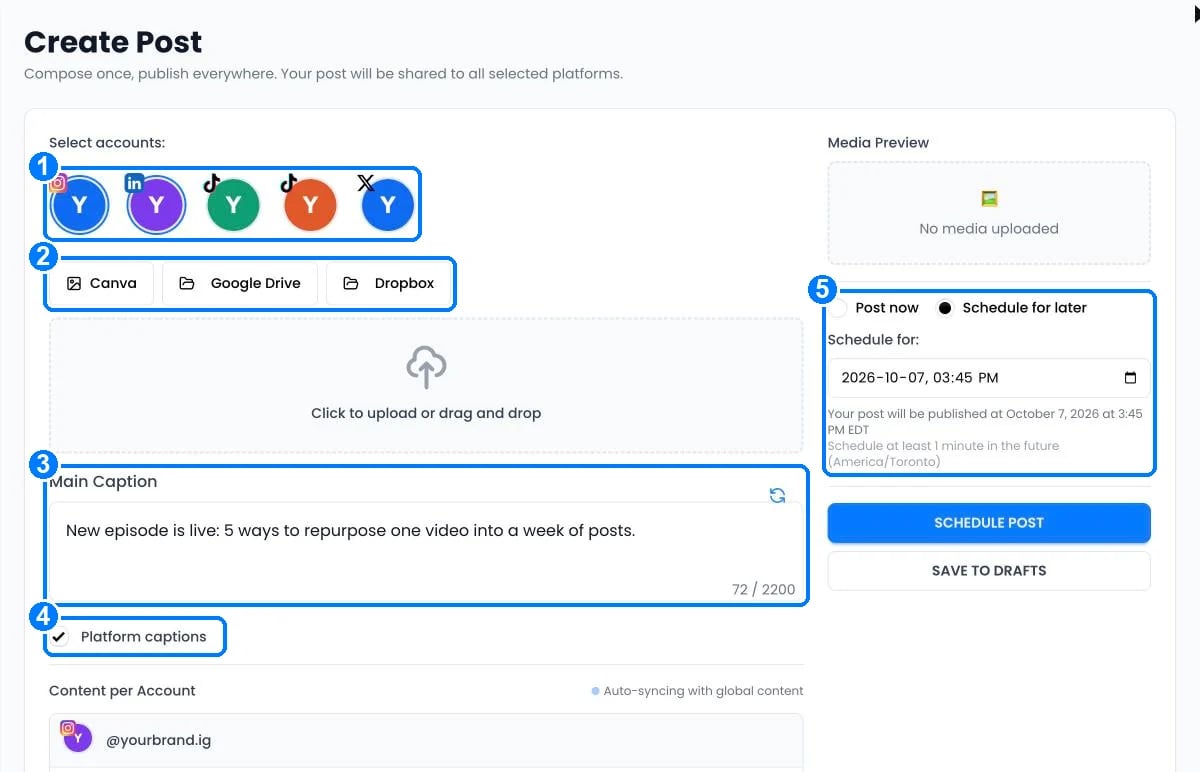 Each import adds **one PNG or JPG image up to 20 MB**. To add videos, upload the file directly. Imported images are copies; changing the original later doesn't change your post.
## Google Drive
1. Click **Google Drive**. The first time, click **Connect Google Drive** and approve access in the window that opens.
2. Choose an image. It's added to your post.
The same Google Drive connection is used for [backups](/help/platforms/google-drive). If you have several, pick one under **Google Drive account**.
## Dropbox
1. Click **Dropbox**, then **Choose image**. Dropbox opens a file chooser in a new window; sign in there if needed.
2. Choose an image.
Dropbox doesn't need a saved connection. If nothing opens, allow pop-ups for postonce.to.
## Canva
When the **Canva** button is shown, click it, connect your Canva account, search for a design and choose the page to import. If the button isn't there or the connection fails, export a PNG or JPG from Canva and upload it.
## Import errors
| Error message | What to do |
| - | - |
| "This image is larger than 20 MB. Choose a smaller PNG or JPG." | Compress or resize the image. |
| "Choose a PNG or JPG image. Google Docs, folders and videos cannot be imported here." | Pick a PNG or JPG file. Upload videos directly. |
| "Google Drive does not allow this download. Check the file's sharing settings or choose another image." | Make sure your account can download the file. |
| "Dropbox could not open. Allow pop-ups, then choose your image again." | Allow pop-ups for postonce.to. |
| "Your Canva connection expired. Reconnect to continue." | Reconnect Canva. |
| "Canva could not export this page. Check access to any paid elements, or choose another design." | Remove paid elements you don't have access to, or export from Canva. |
## Still stuck?
Search this help center with ⌘ K, or email [support@postonce.to](mailto:support@postonce.to) from the address you use for PostOnce. Include the platform, the approximate time, and the exact message you saw. Never send passwords, access tokens, API keys, or card details.
Something missing from PostOnce? [Request a feature](https://postonce.featurebase.app/) or check the [roadmap](https://postonce.featurebase.app/roadmap).
This documentation is built and hosted on [Mintlify](https://mintlify.com), a developer documentation platform.
Each import adds **one PNG or JPG image up to 20 MB**. To add videos, upload the file directly. Imported images are copies; changing the original later doesn't change your post.
## Google Drive
1. Click **Google Drive**. The first time, click **Connect Google Drive** and approve access in the window that opens.
2. Choose an image. It's added to your post.
The same Google Drive connection is used for [backups](/help/platforms/google-drive). If you have several, pick one under **Google Drive account**.
## Dropbox
1. Click **Dropbox**, then **Choose image**. Dropbox opens a file chooser in a new window; sign in there if needed.
2. Choose an image.
Dropbox doesn't need a saved connection. If nothing opens, allow pop-ups for postonce.to.
## Canva
When the **Canva** button is shown, click it, connect your Canva account, search for a design and choose the page to import. If the button isn't there or the connection fails, export a PNG or JPG from Canva and upload it.
## Import errors
| Error message | What to do |
| - | - |
| "This image is larger than 20 MB. Choose a smaller PNG or JPG." | Compress or resize the image. |
| "Choose a PNG or JPG image. Google Docs, folders and videos cannot be imported here." | Pick a PNG or JPG file. Upload videos directly. |
| "Google Drive does not allow this download. Check the file's sharing settings or choose another image." | Make sure your account can download the file. |
| "Dropbox could not open. Allow pop-ups, then choose your image again." | Allow pop-ups for postonce.to. |
| "Your Canva connection expired. Reconnect to continue." | Reconnect Canva. |
| "Canva could not export this page. Check access to any paid elements, or choose another design." | Remove paid elements you don't have access to, or export from Canva. |
## Still stuck?
Search this help center with ⌘ K, or email [support@postonce.to](mailto:support@postonce.to) from the address you use for PostOnce. Include the platform, the approximate time, and the exact message you saw. Never send passwords, access tokens, API keys, or card details.
Something missing from PostOnce? [Request a feature](https://postonce.featurebase.app/) or check the [roadmap](https://postonce.featurebase.app/roadmap).
This documentation is built and hosted on [Mintlify](https://mintlify.com), a developer documentation platform.