> ## Documentation Index
> Fetch the complete documentation index at: https://docs.postonce.to/llms.txt
> Use this file to discover all available pages before exploring further.
# Manage scheduled posts and drafts
> See upcoming PostOnce posts in a calendar or list, change their time or text, cancel them, handle posts that need rescheduling, and keep drafts. Includes what each post status means.
## Scheduled posts
Open [Posts › Scheduled](https://postonce.to/dashboard/posts/scheduled) to see upcoming posts in **Calendar View** or **List View**. Workflow posts waiting for their time slot appear here too.
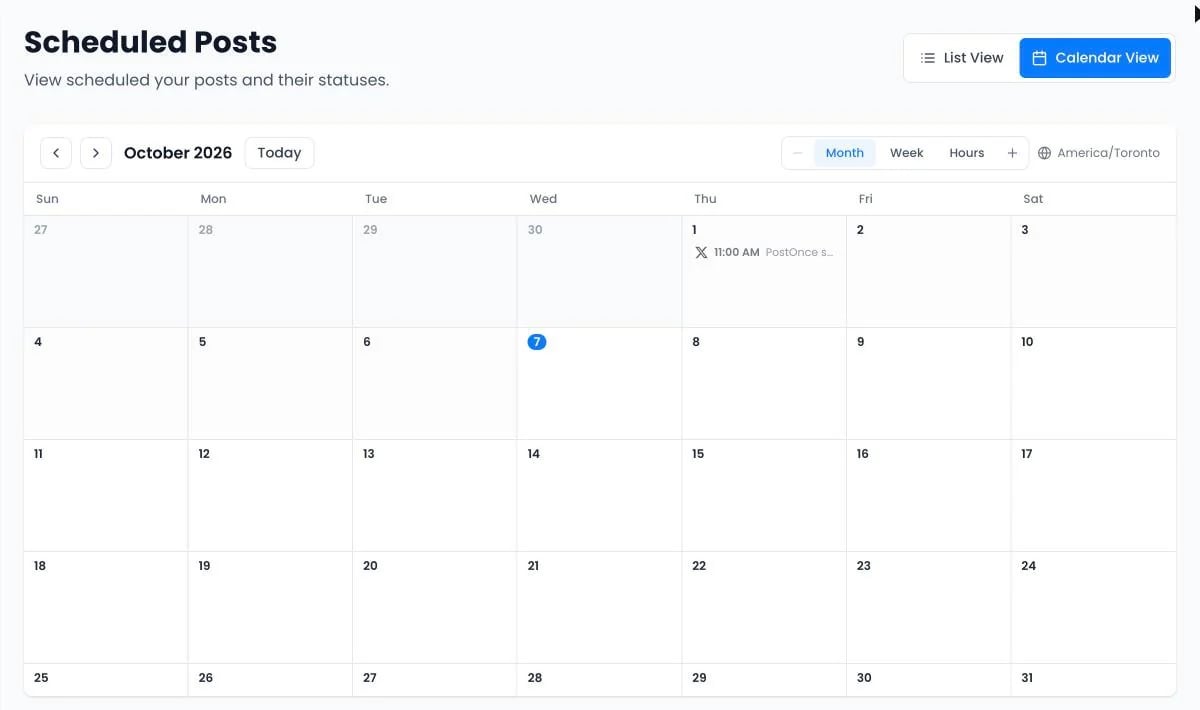 * **Change the time**: drag the post to another day in the calendar, or choose **Change time** in the list. You can undo a drag.
* **Edit the text**: choose **Edit post**. Media can't be changed on a scheduled post; cancel it and create a new one instead.
* **Cancel**: open **More actions › Cancel post**. This can't be undone.
* **Open workflow**: jump to the workflow a queued post belongs to.
The calendar shows times in your browser's timezone. Switch between **Month**, **Week** and **Hours**.
### Needs attention
If publishing was paused, for example after a failed payment, posts that missed their time appear under **Needs attention**. Nothing publishes until you choose **Reschedule**, **Publish now** or **Delete** for each one.
## Drafts
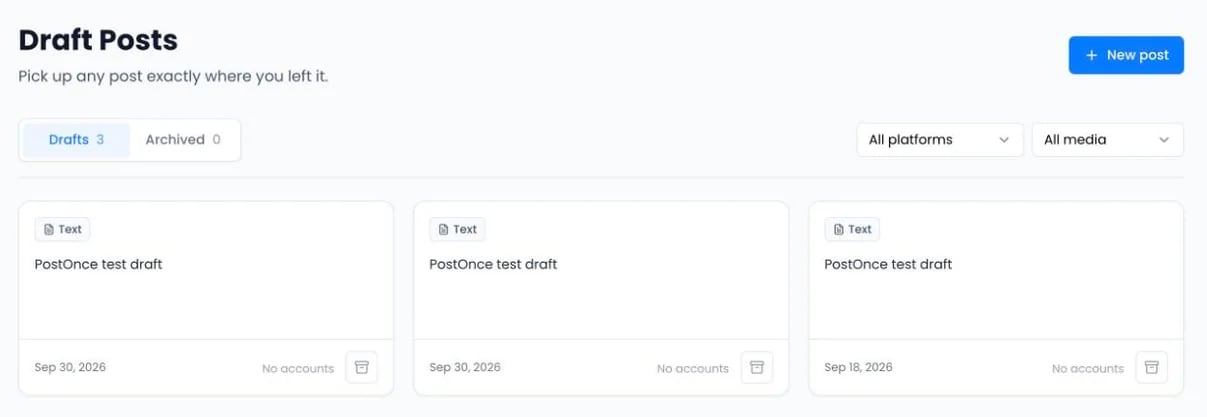
[Posts › Drafts](https://postonce.to/dashboard/posts/drafts) keeps posts you saved without publishing. Click a draft to continue where you left off. Archive drafts you don't need; they move to **Archived**, where you can restore them.
* **Change the time**: drag the post to another day in the calendar, or choose **Change time** in the list. You can undo a drag.
* **Edit the text**: choose **Edit post**. Media can't be changed on a scheduled post; cancel it and create a new one instead.
* **Cancel**: open **More actions › Cancel post**. This can't be undone.
* **Open workflow**: jump to the workflow a queued post belongs to.
The calendar shows times in your browser's timezone. Switch between **Month**, **Week** and **Hours**.
### Needs attention
If publishing was paused, for example after a failed payment, posts that missed their time appear under **Needs attention**. Nothing publishes until you choose **Reschedule**, **Publish now** or **Delete** for each one.
## Drafts
[Posts › Drafts](https://postonce.to/dashboard/posts/drafts) keeps posts you saved without publishing. Click a draft to continue where you left off. Archive drafts you don't need; they move to **Archived**, where you can restore them.
 ## Post statuses
| Status | What it means |
| - | - |
| Scheduled / Queued | Waiting for its time. Queued posts come from a workflow. |
| Processing | PostOnce is preparing the media or sending it to the platform. |
| Under review | The platform accepted the post and is checking it before it goes live. |
| Retry scheduled | The first attempt failed. PostOnce tries again 15 minutes later. |
| Published | The post is live. |
| Failed | The platform rejected the post. See [Fix a problem](/help/troubleshooting). |
| Skipped | The post didn't match a rule, such as a filter or the duplicate check. |
| Paused | Publishing is paused, for example while billing needs attention. |
| Needs rescheduling | The scheduled time passed while publishing was paused. |
All your posts and their results are on [Posts › Published](https://postonce.to/dashboard/posts/published). Hover over a **Failed** label to see why.
## Still stuck?
Search this help center with ⌘ K, or email [support@postonce.to](mailto:support@postonce.to) from the address you use for PostOnce. Include the platform, the approximate time, and the exact message you saw. Never send passwords, access tokens, API keys, or card details.
Something missing from PostOnce? [Request a feature](https://postonce.featurebase.app/) or check the [roadmap](https://postonce.featurebase.app/roadmap).
This documentation is built and hosted on [Mintlify](https://mintlify.com), a developer documentation platform.
## Post statuses
| Status | What it means |
| - | - |
| Scheduled / Queued | Waiting for its time. Queued posts come from a workflow. |
| Processing | PostOnce is preparing the media or sending it to the platform. |
| Under review | The platform accepted the post and is checking it before it goes live. |
| Retry scheduled | The first attempt failed. PostOnce tries again 15 minutes later. |
| Published | The post is live. |
| Failed | The platform rejected the post. See [Fix a problem](/help/troubleshooting). |
| Skipped | The post didn't match a rule, such as a filter or the duplicate check. |
| Paused | Publishing is paused, for example while billing needs attention. |
| Needs rescheduling | The scheduled time passed while publishing was paused. |
All your posts and their results are on [Posts › Published](https://postonce.to/dashboard/posts/published). Hover over a **Failed** label to see why.
## Still stuck?
Search this help center with ⌘ K, or email [support@postonce.to](mailto:support@postonce.to) from the address you use for PostOnce. Include the platform, the approximate time, and the exact message you saw. Never send passwords, access tokens, API keys, or card details.
Something missing from PostOnce? [Request a feature](https://postonce.featurebase.app/) or check the [roadmap](https://postonce.featurebase.app/roadmap).
This documentation is built and hosted on [Mintlify](https://mintlify.com), a developer documentation platform.