> ## Documentation Index
> Fetch the complete documentation index at: https://docs.postonce.to/llms.txt
> Use this file to discover all available pages before exploring further.
# Using Bluesky with PostOnce
> Connect Bluesky to PostOnce with an app password, copy Bluesky posts to other platforms, and publish text, images and video to Bluesky. Limits and errors.
PostOnce can copy your Bluesky posts to other platforms and publish to Bluesky.
## Connect Bluesky with an app password
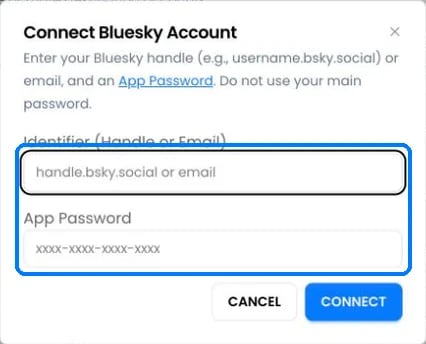 Bluesky connects with an **app password**, not your main password.
1. In Bluesky, open [Settings › App passwords](https://bsky.app/settings/app-passwords) and create one named "PostOnce".
2. On [Accounts](https://postonce.to/dashboard/accounts), click **Connect Bluesky**.
3. Enter your handle (for example `name.bsky.social`) or email, and the app password (`xxxx-xxxx-xxxx-xxxx`). Click **Connect**.
To disconnect PostOnce from the Bluesky side, delete the app password in Bluesky.
## Bluesky as a source
* PostOnce checks Bluesky for new posts every 5 minutes.
* Text, images, videos and quote posts can be copied. Reposts of other people's posts aren't copied.
## Publishing to Bluesky
| | Limit |
| - | - |
| Text | 300 characters |
| Images | Up to 4, 2 MB each, longest side 4,000 pixels |
| Video | 1 video, up to 3 minutes and 100 MB |
Images and video can't be mixed. Links, #hashtags and @mentions are made clickable. Link preview cards aren't added.
Bluesky only accepts videos from accounts with a **verified email address** and a saved profile.
## Bluesky errors
| Error message | What to do |
| - | - |
| "BlueSky authentication failed or token expired. Please reconnect account." | Create a new app password in Bluesky and [reconnect](/help/reconnect-an-account). |
| "BlueSky account is disconnected, please reconnect" | Reconnect with an app password. |
| "BlueSky profile setup is incomplete. Open BlueSky, edit and save your profile, then try again." | Open your Bluesky profile, click **Edit profile**, save, then retry. |
| "BlueSky video upload requires email verification. Please verify your email address in BlueSky settings and try again." | Verify your email in Bluesky settings, then retry. |
| "Video ({N}MB) exceeds Bluesky's 100MB limit. Try a shorter or lower-resolution video." | Use a smaller video. |
| "Video duration ({N}s) exceeds Bluesky's 3-minute limit. Please use a shorter video." | Use a video under 3 minutes. |
| "BlueSky video processing failed" | Retry. If it fails again, re-export the video as MP4. |
## Still stuck?
Search this help center with ⌘ K, or email [support@postonce.to](mailto:support@postonce.to) from the address you use for PostOnce. Include the platform, the approximate time, and the exact message you saw. Never send passwords, access tokens, API keys, or card details.
Something missing from PostOnce? [Request a feature](https://postonce.featurebase.app/) or check the [roadmap](https://postonce.featurebase.app/roadmap).
This documentation is built and hosted on [Mintlify](https://mintlify.com), a developer documentation platform.
Bluesky connects with an **app password**, not your main password.
1. In Bluesky, open [Settings › App passwords](https://bsky.app/settings/app-passwords) and create one named "PostOnce".
2. On [Accounts](https://postonce.to/dashboard/accounts), click **Connect Bluesky**.
3. Enter your handle (for example `name.bsky.social`) or email, and the app password (`xxxx-xxxx-xxxx-xxxx`). Click **Connect**.
To disconnect PostOnce from the Bluesky side, delete the app password in Bluesky.
## Bluesky as a source
* PostOnce checks Bluesky for new posts every 5 minutes.
* Text, images, videos and quote posts can be copied. Reposts of other people's posts aren't copied.
## Publishing to Bluesky
| | Limit |
| - | - |
| Text | 300 characters |
| Images | Up to 4, 2 MB each, longest side 4,000 pixels |
| Video | 1 video, up to 3 minutes and 100 MB |
Images and video can't be mixed. Links, #hashtags and @mentions are made clickable. Link preview cards aren't added.
Bluesky only accepts videos from accounts with a **verified email address** and a saved profile.
## Bluesky errors
| Error message | What to do |
| - | - |
| "BlueSky authentication failed or token expired. Please reconnect account." | Create a new app password in Bluesky and [reconnect](/help/reconnect-an-account). |
| "BlueSky account is disconnected, please reconnect" | Reconnect with an app password. |
| "BlueSky profile setup is incomplete. Open BlueSky, edit and save your profile, then try again." | Open your Bluesky profile, click **Edit profile**, save, then retry. |
| "BlueSky video upload requires email verification. Please verify your email address in BlueSky settings and try again." | Verify your email in Bluesky settings, then retry. |
| "Video ({N}MB) exceeds Bluesky's 100MB limit. Try a shorter or lower-resolution video." | Use a smaller video. |
| "Video duration ({N}s) exceeds Bluesky's 3-minute limit. Please use a shorter video." | Use a video under 3 minutes. |
| "BlueSky video processing failed" | Retry. If it fails again, re-export the video as MP4. |
## Still stuck?
Search this help center with ⌘ K, or email [support@postonce.to](mailto:support@postonce.to) from the address you use for PostOnce. Include the platform, the approximate time, and the exact message you saw. Never send passwords, access tokens, API keys, or card details.
Something missing from PostOnce? [Request a feature](https://postonce.featurebase.app/) or check the [roadmap](https://postonce.featurebase.app/roadmap).
This documentation is built and hosted on [Mintlify](https://mintlify.com), a developer documentation platform.