> ## Documentation Index
> Fetch the complete documentation index at: https://docs.postonce.to/llms.txt
> Use this file to discover all available pages before exploring further.
# Using Instagram with PostOnce
> Connect an Instagram Business or Creator account to PostOnce, copy Reels, carousels and Stories to other platforms, and publish to Instagram automatically. Limits, settings and errors.
PostOnce can copy your Instagram posts to other platforms, and publish posts from other platforms to Instagram. It works with **Business and Creator** accounts.
## Connect Instagram
 1. On [Accounts](https://postonce.to/dashboard/accounts), click **Connect Instagram**.
2. Sign in to Instagram and approve access. You don't need a Facebook Page.
Personal Instagram accounts can't be connected. Switch to a Professional account in the Instagram app under **Settings and privacy › Account type and tools**, then connect again.
If Instagram leaves you on instagram.com and never returns to PostOnce, click **Connect Instagram** again. PostOnce then opens Instagram's full login page, which completes the connection. This also happens after switching to a Business or Creator account. To connect a second Instagram account, the same full login page lets you choose which account to sign in with.
## Instagram as a source
1. On [Accounts](https://postonce.to/dashboard/accounts), click **Connect Instagram**.
2. Sign in to Instagram and approve access. You don't need a Facebook Page.
Personal Instagram accounts can't be connected. Switch to a Professional account in the Instagram app under **Settings and privacy › Account type and tools**, then connect again.
If Instagram leaves you on instagram.com and never returns to PostOnce, click **Connect Instagram** again. PostOnce then opens Instagram's full login page, which completes the connection. This also happens after switching to a Business or Creator account. To connect a second Instagram account, the same full login page lets you choose which account to sign in with.
## Instagram as a source
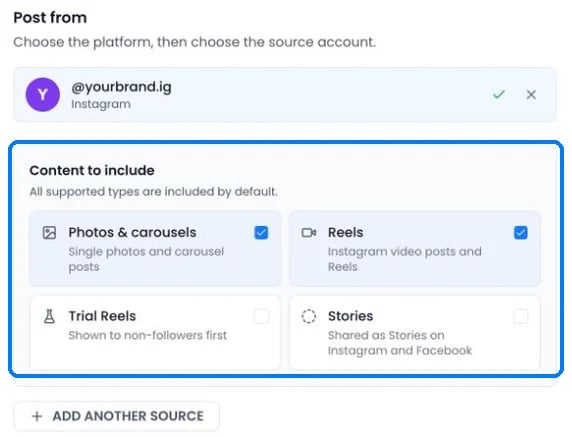 * **Photos & carousels** and **Reels** are included by default.
* **Trial Reels** (Reels shown to non-followers first) and **Stories** are off by default. Turn them on in the workflow or under **Settings › Source**.
* Stories are copied as Stories to Instagram and Facebook destinations, and as normal posts everywhere else.
* PostOnce checks Instagram for new posts every 5 minutes.
* If the original is deleted, archived or made private before PostOnce copies it, the post is skipped.
## Publishing to Instagram
| Post | What PostOnce publishes |
| - | - |
| One image | A feed post |
| Several images or videos | A carousel of up to 10 items. Extra items are dropped. |
| One video | A Reel, 3 seconds to 15 minutes |
| Story | One image or a video up to 60 seconds, with no caption |
| Text only | Skipped. Instagram needs an image or video. |
**Limits**
| | Limit |
| - | - |
| Caption | 2,200 characters, first 30 hashtags kept |
| Images | 8 MB each |
| Carousel videos | 3 to 60 seconds each |
| Aspect ratio | Feed 4:5 to 1.91:1. Reels and Stories 9:16. |
| Posts per day | 50 in any 24 hours. Extra automatic posts wait for the next free slot. |
Videos wider than 1920 pixels or larger than 300 MB are resized before publishing. Line breaks in captions are kept.
### Instagram settings in a workflow
Open the workflow, click **Settings › Destinations** and pick the Instagram account:
* **Publish as Trial Reels** sends single-video posts as Trial Reels, shown to non-followers first. Images and carousels are not sent to that account. Share the Trial Reel to your followers yourself in Instagram.
* **Post everything as Stories** posts every single image or short video as a Story. Carousels, text-only posts and videos over 60 seconds are skipped. Trial Reels and Stories can't both be on.
* **Remove @mentions from captions** removes the @ from usernames so other accounts aren't tagged. Email addresses are left alone.
* The caption options and **Set time between posts** work as described in [Captions for each platform](/help/captions) and [How fast posts publish](/help/publishing-timing).
Without a gap set, PostOnce waits 5 minutes between automatic Instagram posts. Posting faster can get the account temporarily blocked by Instagram.
## What Instagram doesn't allow
* Links in captions aren't clickable on Instagram. Use "link in bio" instead.
* Music, stickers and polls can't be added through Instagram's API.
* Text-only posts can't be published.
## Instagram errors
| Error message | What to do |
| - | - |
| "Invalid Instagram token or permissions, please reconnect." | [Reconnect](/help/reconnect-an-account) Instagram. Make sure it's still a Business or Creator account. |
| "Instagram temporarily blocked this account for posting too quickly. PostOnce now spaces automatic Instagram posts; try again later." | Wait a few hours, then retry. Turn on **Set time between posts** for this account. |
| "Rate limited by Instagram API." | Retry in an hour. |
| "Instagram says this account isn't eligible for Trial Reels. Turn off Trial Reels in workflow settings, then retry." | Turn off **Publish as Trial Reels** in the workflow's Destinations settings. |
| "Instagram Reel video must be between 3 and 900 seconds; received {N} seconds." | Use a video between 3 seconds and 15 minutes. |
| "Media (image or video) is required to create an Instagram post." | Add an image or video. Instagram doesn't accept text-only posts. |
| "Carousel posts must contain at least 2 images or videos." | Add a second item, or post a single image. |
| "Media processing failed or expired on Instagram. Status: {status}. Details: {details}" | Retry. If it fails again, re-export the video as MP4 (H.264) in 9:16. |
| "Media processing timed out on Instagram. Last status: {status}" | Retry later. |
| "Reconnect Instagram to access this private source video." | Reconnect the Instagram source account. |
| "This Instagram post is unavailable. It may have been deleted, archived, made private, or you may no longer have access." | Restore the original post or make it public. |
| "Instagram connection was cancelled." / "The Instagram connection expired. Please try again." | Start the connection again and finish it on Instagram's screen. |
## Still stuck?
Search this help center with ⌘ K, or email [support@postonce.to](mailto:support@postonce.to) from the address you use for PostOnce. Include the platform, the approximate time, and the exact message you saw. Never send passwords, access tokens, API keys, or card details.
Something missing from PostOnce? [Request a feature](https://postonce.featurebase.app/) or check the [roadmap](https://postonce.featurebase.app/roadmap).
This documentation is built and hosted on [Mintlify](https://mintlify.com), a developer documentation platform.
* **Photos & carousels** and **Reels** are included by default.
* **Trial Reels** (Reels shown to non-followers first) and **Stories** are off by default. Turn them on in the workflow or under **Settings › Source**.
* Stories are copied as Stories to Instagram and Facebook destinations, and as normal posts everywhere else.
* PostOnce checks Instagram for new posts every 5 minutes.
* If the original is deleted, archived or made private before PostOnce copies it, the post is skipped.
## Publishing to Instagram
| Post | What PostOnce publishes |
| - | - |
| One image | A feed post |
| Several images or videos | A carousel of up to 10 items. Extra items are dropped. |
| One video | A Reel, 3 seconds to 15 minutes |
| Story | One image or a video up to 60 seconds, with no caption |
| Text only | Skipped. Instagram needs an image or video. |
**Limits**
| | Limit |
| - | - |
| Caption | 2,200 characters, first 30 hashtags kept |
| Images | 8 MB each |
| Carousel videos | 3 to 60 seconds each |
| Aspect ratio | Feed 4:5 to 1.91:1. Reels and Stories 9:16. |
| Posts per day | 50 in any 24 hours. Extra automatic posts wait for the next free slot. |
Videos wider than 1920 pixels or larger than 300 MB are resized before publishing. Line breaks in captions are kept.
### Instagram settings in a workflow
Open the workflow, click **Settings › Destinations** and pick the Instagram account:
* **Publish as Trial Reels** sends single-video posts as Trial Reels, shown to non-followers first. Images and carousels are not sent to that account. Share the Trial Reel to your followers yourself in Instagram.
* **Post everything as Stories** posts every single image or short video as a Story. Carousels, text-only posts and videos over 60 seconds are skipped. Trial Reels and Stories can't both be on.
* **Remove @mentions from captions** removes the @ from usernames so other accounts aren't tagged. Email addresses are left alone.
* The caption options and **Set time between posts** work as described in [Captions for each platform](/help/captions) and [How fast posts publish](/help/publishing-timing).
Without a gap set, PostOnce waits 5 minutes between automatic Instagram posts. Posting faster can get the account temporarily blocked by Instagram.
## What Instagram doesn't allow
* Links in captions aren't clickable on Instagram. Use "link in bio" instead.
* Music, stickers and polls can't be added through Instagram's API.
* Text-only posts can't be published.
## Instagram errors
| Error message | What to do |
| - | - |
| "Invalid Instagram token or permissions, please reconnect." | [Reconnect](/help/reconnect-an-account) Instagram. Make sure it's still a Business or Creator account. |
| "Instagram temporarily blocked this account for posting too quickly. PostOnce now spaces automatic Instagram posts; try again later." | Wait a few hours, then retry. Turn on **Set time between posts** for this account. |
| "Rate limited by Instagram API." | Retry in an hour. |
| "Instagram says this account isn't eligible for Trial Reels. Turn off Trial Reels in workflow settings, then retry." | Turn off **Publish as Trial Reels** in the workflow's Destinations settings. |
| "Instagram Reel video must be between 3 and 900 seconds; received {N} seconds." | Use a video between 3 seconds and 15 minutes. |
| "Media (image or video) is required to create an Instagram post." | Add an image or video. Instagram doesn't accept text-only posts. |
| "Carousel posts must contain at least 2 images or videos." | Add a second item, or post a single image. |
| "Media processing failed or expired on Instagram. Status: {status}. Details: {details}" | Retry. If it fails again, re-export the video as MP4 (H.264) in 9:16. |
| "Media processing timed out on Instagram. Last status: {status}" | Retry later. |
| "Reconnect Instagram to access this private source video." | Reconnect the Instagram source account. |
| "This Instagram post is unavailable. It may have been deleted, archived, made private, or you may no longer have access." | Restore the original post or make it public. |
| "Instagram connection was cancelled." / "The Instagram connection expired. Please try again." | Start the connection again and finish it on Instagram's screen. |
## Still stuck?
Search this help center with ⌘ K, or email [support@postonce.to](mailto:support@postonce.to) from the address you use for PostOnce. Include the platform, the approximate time, and the exact message you saw. Never send passwords, access tokens, API keys, or card details.
Something missing from PostOnce? [Request a feature](https://postonce.featurebase.app/) or check the [roadmap](https://postonce.featurebase.app/roadmap).
This documentation is built and hosted on [Mintlify](https://mintlify.com), a developer documentation platform.