> ## Documentation Index
> Fetch the complete documentation index at: https://docs.postonce.to/llms.txt
> Use this file to discover all available pages before exploring further.
# Using Pinterest with PostOnce
> Connect Pinterest to PostOnce, copy your Pins to other platforms, and publish image and video Pins automatically. Boards, titles, limits and errors.
PostOnce can copy your Pins to other platforms and publish image and video Pins from other platforms.
## Connect Pinterest
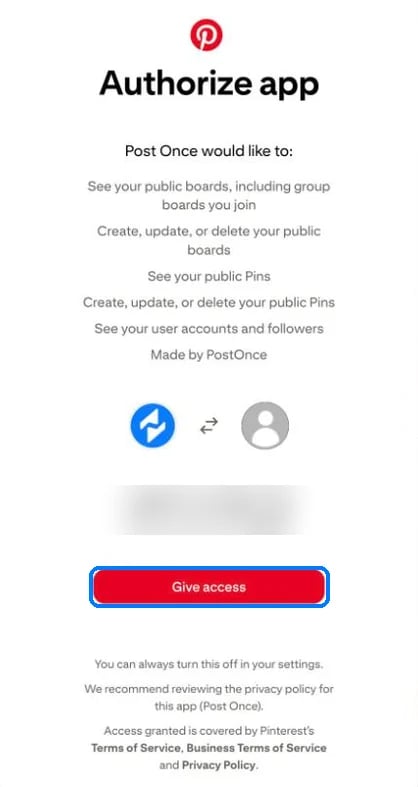
On [Accounts](https://postonce.to/dashboard/accounts), click **Connect Pinterest**. Pinterest shows what PostOnce can do; click **Give access**.
 ## Pinterest as a source
* PostOnce checks Pinterest for new Pins every 10 minutes.
* A deleted or private Pin is skipped with "This Pin was deleted or made private."
## Publishing to Pinterest
Pinterest needs an image or video. Text-only posts are skipped.
| | Limit |
| - | - |
| Title | 100 characters |
| Description | 500 characters |
| Images | 1 to 5 per Pin, 32 MB each, same shape |
| Video | 4 seconds to 5 minutes, up to 2 GB |
**Title:** the source's title, or else the start of the caption.
**Board:** in [Create Post](/help/create-and-schedule-posts) you choose the board. Workflows don't have a board setting. PostOnce uses your saved default board, then a board named "PostOnce", then your first board. If you have no boards, it creates a public board named "PostOnce".
PostOnce creates the cover image for video Pins. If Pinterest rejects images of different shapes, PostOnce posts the first image on its own.
## Pinterest errors
| Error message | What to do |
| - | - |
| "Pinterest authentication failed" | [Reconnect](/help/reconnect-an-account) Pinterest. |
| "Pinterest API rate limit exceeded while creating pin." | Retry later. |
| "Images must have the same width/height ratios" | Use images with the same shape in one Pin. |
| "Pinterest rejected the video during processing. The video was uploaded, but no Pin was created." | Check the video is 4 seconds to 5 minutes, then retry. |
| "Pinterest video processing timed out. Please retry later." | Retry later. |
| "Pinterest requires at least one image or video" | Add an image or video. |
## Still stuck?
Search this help center with ⌘ K, or email [support@postonce.to](mailto:support@postonce.to) from the address you use for PostOnce. Include the platform, the approximate time, and the exact message you saw. Never send passwords, access tokens, API keys, or card details.
Something missing from PostOnce? [Request a feature](https://postonce.featurebase.app/) or check the [roadmap](https://postonce.featurebase.app/roadmap).
This documentation is built and hosted on [Mintlify](https://mintlify.com), a developer documentation platform.
## Pinterest as a source
* PostOnce checks Pinterest for new Pins every 10 minutes.
* A deleted or private Pin is skipped with "This Pin was deleted or made private."
## Publishing to Pinterest
Pinterest needs an image or video. Text-only posts are skipped.
| | Limit |
| - | - |
| Title | 100 characters |
| Description | 500 characters |
| Images | 1 to 5 per Pin, 32 MB each, same shape |
| Video | 4 seconds to 5 minutes, up to 2 GB |
**Title:** the source's title, or else the start of the caption.
**Board:** in [Create Post](/help/create-and-schedule-posts) you choose the board. Workflows don't have a board setting. PostOnce uses your saved default board, then a board named "PostOnce", then your first board. If you have no boards, it creates a public board named "PostOnce".
PostOnce creates the cover image for video Pins. If Pinterest rejects images of different shapes, PostOnce posts the first image on its own.
## Pinterest errors
| Error message | What to do |
| - | - |
| "Pinterest authentication failed" | [Reconnect](/help/reconnect-an-account) Pinterest. |
| "Pinterest API rate limit exceeded while creating pin." | Retry later. |
| "Images must have the same width/height ratios" | Use images with the same shape in one Pin. |
| "Pinterest rejected the video during processing. The video was uploaded, but no Pin was created." | Check the video is 4 seconds to 5 minutes, then retry. |
| "Pinterest video processing timed out. Please retry later." | Retry later. |
| "Pinterest requires at least one image or video" | Add an image or video. |
## Still stuck?
Search this help center with ⌘ K, or email [support@postonce.to](mailto:support@postonce.to) from the address you use for PostOnce. Include the platform, the approximate time, and the exact message you saw. Never send passwords, access tokens, API keys, or card details.
Something missing from PostOnce? [Request a feature](https://postonce.featurebase.app/) or check the [roadmap](https://postonce.featurebase.app/roadmap).
This documentation is built and hosted on [Mintlify](https://mintlify.com), a developer documentation platform.