> ## Documentation Index
> Fetch the complete documentation index at: https://docs.postonce.to/llms.txt
> Use this file to discover all available pages before exploring further.
# Using TikTok with PostOnce
> Connect TikTok to PostOnce, copy TikTok videos and photo posts to other platforms, and publish to TikTok with privacy, disclosure and draft options. Daily limits, settings and errors.
PostOnce can copy your TikTok videos and photo posts to other platforms, and publish videos and photos to TikTok.
## Connect TikTok
 On [Accounts](https://postonce.to/dashboard/accounts), click **Connect TikTok**, sign in and approve access. You can connect several TikTok accounts.
## TikTok as a source
On [Accounts](https://postonce.to/dashboard/accounts), click **Connect TikTok**, sign in and approve access. You can connect several TikTok accounts.
## TikTok as a source
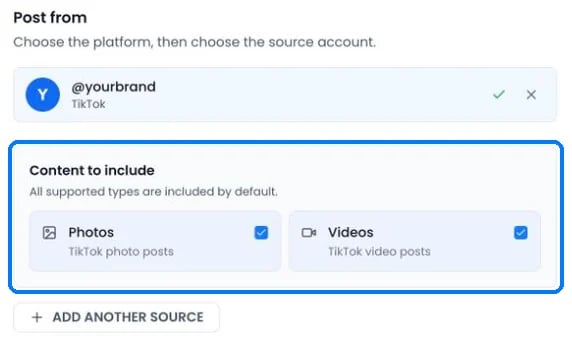 * **Photos** (photo posts and carousels) and **Videos** are both included by default.
* PostOnce checks TikTok for new posts every 10 minutes.
* The account and the post must be public. If a TikTok source account is made private, PostOnce pauses the workflow and keeps the queued posts until you make it public again and click **Resume workflow**.
* Public videos whose sound TikTok muted are still imported.
## Publishing to TikTok
| Post | What PostOnce publishes |
| - | - |
| One video | A video post, up to 10 minutes (or less if your account allows less) |
| Images | A photo post with up to 35 images. TikTok adds music automatically. |
| Text only | Skipped. TikTok needs a video or images. |
| Video and images together | Not allowed in one TikTok post |
**Limits**
| | Limit |
| - | - |
| Video caption | 2,200 characters, first 5 hashtags kept |
| Photo post | Title up to 90 characters, description up to 4,000 |
| Video size | 4 GB |
| Image size | 20 MB |
| Formats | JPEG, WebP, MP4, WebM, MOV. No GIFs. |
| Posts per day | 14 in any 24 hours. Extra automatic posts wait for the next free slot. |
TikTok blocks accounts that post too often through apps, so PostOnce keeps each TikTok account under 14 posts in any 24 hours. If a workflow brings more than that, posts queue up and publish later. Turn on **Set time between posts** to spread them out evenly. Posts you publish in the TikTok app don't count toward PostOnce's limit, but they count toward TikTok's.
Line breaks and blank lines between paragraphs are kept.
### TikTok options when you create a post
* **Photos** (photo posts and carousels) and **Videos** are both included by default.
* PostOnce checks TikTok for new posts every 10 minutes.
* The account and the post must be public. If a TikTok source account is made private, PostOnce pauses the workflow and keeps the queued posts until you make it public again and click **Resume workflow**.
* Public videos whose sound TikTok muted are still imported.
## Publishing to TikTok
| Post | What PostOnce publishes |
| - | - |
| One video | A video post, up to 10 minutes (or less if your account allows less) |
| Images | A photo post with up to 35 images. TikTok adds music automatically. |
| Text only | Skipped. TikTok needs a video or images. |
| Video and images together | Not allowed in one TikTok post |
**Limits**
| | Limit |
| - | - |
| Video caption | 2,200 characters, first 5 hashtags kept |
| Photo post | Title up to 90 characters, description up to 4,000 |
| Video size | 4 GB |
| Image size | 20 MB |
| Formats | JPEG, WebP, MP4, WebM, MOV. No GIFs. |
| Posts per day | 14 in any 24 hours. Extra automatic posts wait for the next free slot. |
TikTok blocks accounts that post too often through apps, so PostOnce keeps each TikTok account under 14 posts in any 24 hours. If a workflow brings more than that, posts queue up and publish later. Turn on **Set time between posts** to spread them out evenly. Posts you publish in the TikTok app don't count toward PostOnce's limit, but they count toward TikTok's.
Line breaks and blank lines between paragraphs are kept.
### TikTok options when you create a post
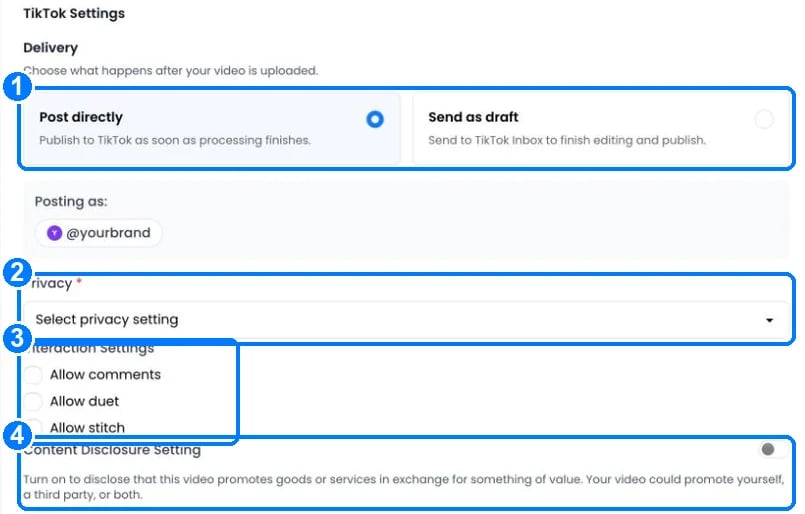 1. **Delivery**: **Post directly** publishes as soon as processing finishes. **Send as draft** sends the video to your TikTok inbox so you can add music or effects in the app and publish it there. Drafts only work when TikTok is the only account selected.
2. **Privacy**: Public, Friends, Followers or Private. The choices come from your TikTok account.
3. **Interaction settings**: allow comments, Duet and Stitch. Duet and Stitch aren't available for photo posts.
4. **Content Disclosure Setting**: turn on when the post promotes goods or services. Choose **Your brand** ("Promotional content") or **Branded content** ("Paid partnership"). Branded content can't be private.
When you create a post with TikTok selected, the main text box becomes the **Title**.
### TikTok settings in a workflow
Under **Settings › Destinations** for a TikTok account:
* **Split videos if too long** divides longer videos into the fewest equal parts and publishes them in order. A 24-minute video becomes three 8-minute parts.
* **Keep thumbnail consistent on TikTok** (on by default) uses the source video's thumbnail as the TikTok cover.
* The caption options work as described in [Captions for each platform](/help/captions).
## What TikTok doesn't allow
* Trending sounds, effects and stickers can't be added through TikTok's API. Use **Send as draft** and add them in the TikTok app.
* Text-only posts can't be published.
* Private accounts and private posts can't be used as a source.
## TikTok errors
| Error message | What to do |
| - | - |
| "TikTok token invalid or insufficient permissions. Please reconnect." | [Reconnect](/help/reconnect-an-account) TikTok and approve every permission. |
| "TikTok API Error: {message} (Log ID: {id})" | Read the message. "spam\_risk\_too\_many\_posts" or "rate\_limit\_exceeded" means TikTok thinks the account posts too often. Wait a few hours and turn on **Set time between posts**. |
| "TikTok post failed. Reason: {reason}" | TikTok rejected the video after upload. Fix what the reason describes and retry. |
| "TikTok PHOTO posts require at least one image. This post contains only videos." | Add an image, or post the video on its own. |
| "TikTok supports videos up to 600 seconds. This video is {N} seconds. Please use a shorter video for TikTok." | Use a shorter video, or turn on **Split videos if too long**. |
| "TikTok photo draft titles must be 90 characters or fewer." | Shorten the title. |
| "This TikTok post is private or no longer available. Make the account and post public, then retry, or upload the media directly." | Make the TikTok account and post public, then click **Retry source access**. |
| "This TikTok post requires login or is marked sensitive, so its media cannot be accessed. Make the post accessible, then retry, or upload the media directly." | Remove the restriction on TikTok, then click **Retry source access**. |
| "Branded content cannot be set to private visibility. Please choose public, friends, or followers." | Choose another privacy setting. |
## Still stuck?
Search this help center with ⌘ K, or email [support@postonce.to](mailto:support@postonce.to) from the address you use for PostOnce. Include the platform, the approximate time, and the exact message you saw. Never send passwords, access tokens, API keys, or card details.
Something missing from PostOnce? [Request a feature](https://postonce.featurebase.app/) or check the [roadmap](https://postonce.featurebase.app/roadmap).
This documentation is built and hosted on [Mintlify](https://mintlify.com), a developer documentation platform.
1. **Delivery**: **Post directly** publishes as soon as processing finishes. **Send as draft** sends the video to your TikTok inbox so you can add music or effects in the app and publish it there. Drafts only work when TikTok is the only account selected.
2. **Privacy**: Public, Friends, Followers or Private. The choices come from your TikTok account.
3. **Interaction settings**: allow comments, Duet and Stitch. Duet and Stitch aren't available for photo posts.
4. **Content Disclosure Setting**: turn on when the post promotes goods or services. Choose **Your brand** ("Promotional content") or **Branded content** ("Paid partnership"). Branded content can't be private.
When you create a post with TikTok selected, the main text box becomes the **Title**.
### TikTok settings in a workflow
Under **Settings › Destinations** for a TikTok account:
* **Split videos if too long** divides longer videos into the fewest equal parts and publishes them in order. A 24-minute video becomes three 8-minute parts.
* **Keep thumbnail consistent on TikTok** (on by default) uses the source video's thumbnail as the TikTok cover.
* The caption options work as described in [Captions for each platform](/help/captions).
## What TikTok doesn't allow
* Trending sounds, effects and stickers can't be added through TikTok's API. Use **Send as draft** and add them in the TikTok app.
* Text-only posts can't be published.
* Private accounts and private posts can't be used as a source.
## TikTok errors
| Error message | What to do |
| - | - |
| "TikTok token invalid or insufficient permissions. Please reconnect." | [Reconnect](/help/reconnect-an-account) TikTok and approve every permission. |
| "TikTok API Error: {message} (Log ID: {id})" | Read the message. "spam\_risk\_too\_many\_posts" or "rate\_limit\_exceeded" means TikTok thinks the account posts too often. Wait a few hours and turn on **Set time between posts**. |
| "TikTok post failed. Reason: {reason}" | TikTok rejected the video after upload. Fix what the reason describes and retry. |
| "TikTok PHOTO posts require at least one image. This post contains only videos." | Add an image, or post the video on its own. |
| "TikTok supports videos up to 600 seconds. This video is {N} seconds. Please use a shorter video for TikTok." | Use a shorter video, or turn on **Split videos if too long**. |
| "TikTok photo draft titles must be 90 characters or fewer." | Shorten the title. |
| "This TikTok post is private or no longer available. Make the account and post public, then retry, or upload the media directly." | Make the TikTok account and post public, then click **Retry source access**. |
| "This TikTok post requires login or is marked sensitive, so its media cannot be accessed. Make the post accessible, then retry, or upload the media directly." | Remove the restriction on TikTok, then click **Retry source access**. |
| "Branded content cannot be set to private visibility. Please choose public, friends, or followers." | Choose another privacy setting. |
## Still stuck?
Search this help center with ⌘ K, or email [support@postonce.to](mailto:support@postonce.to) from the address you use for PostOnce. Include the platform, the approximate time, and the exact message you saw. Never send passwords, access tokens, API keys, or card details.
Something missing from PostOnce? [Request a feature](https://postonce.featurebase.app/) or check the [roadmap](https://postonce.featurebase.app/roadmap).
This documentation is built and hosted on [Mintlify](https://mintlify.com), a developer documentation platform.