> ## Documentation Index
> Fetch the complete documentation index at: https://docs.postonce.to/llms.txt
> Use this file to discover all available pages before exploring further.
# How fast posts publish
> How often PostOnce checks each platform for new posts, what Check now does, the difference between Immediately and On the schedule, and how to set time between posts on an account.
## How often PostOnce checks for new posts
PostOnce checks each source account on a schedule. A new post is picked up on the next check, then published once its media is ready.
| Source platform | Checked every |
| - | - |
| Instagram, Threads, Bluesky | 5 minutes |
| Facebook, TikTok, Pinterest | 10 minutes |
| LinkedIn | 15 minutes |
| X, YouTube | 25 minutes |
Most posts reach their destinations within about 30 minutes. Long videos take longer to download and process. Your plan doesn't change these times.
### Check now
On the workflow page, **Check now** looks for new posts right away. You can use it every 2 minutes. The first check on a new workflow imports the account's history (without publishing it) so later checks only pick up new posts.
## Immediately or on the schedule
Under **Settings › Publish**, **When new posts publish** has two options:
* **Immediately**: each new post publishes as soon as it finishes processing. This is the default.
* **On the schedule**: new posts wait for the next free time slot in your publishing schedule, the same schedule used for [existing posts](/help/repost-existing-posts).
## Time between posts
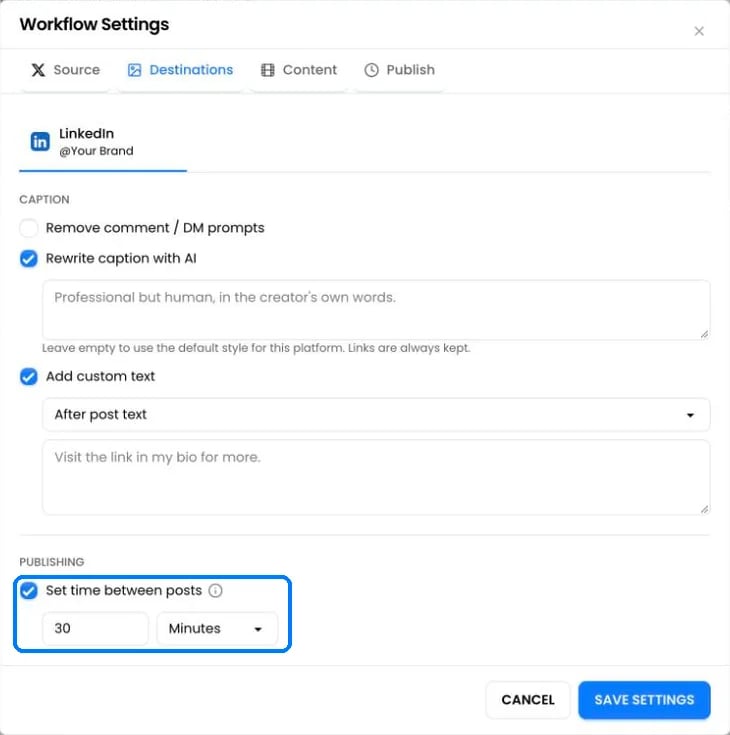 Under **Settings › Destinations**, pick an account and turn on **Set time between posts**. PostOnce then waits at least that long between posts on the account: from 1 minute to 7 days, 30 minutes by default.
* The gap applies to every workflow that posts to that account. If two workflows set different gaps, the longer one wins.
* New posts and **Post now** go first. Scheduled reposts move later to keep the gap.
## Limits PostOnce applies automatically
| Platform | Built-in limit |
| - | - |
| Instagram | 5 minutes between automatic posts when no gap is set. At most 50 posts in any 24 hours. |
| TikTok | At most 14 posts in any 24 hours |
| X | At most 12 posts in any 24 hours, across your X accounts |
Platforms block accounts that post too fast through apps, so these limits keep your accounts safe. When a limit is reached, automatic posts wait for the next free slot instead of failing. Posts you publish directly in the platform's app don't count toward PostOnce's limits, but they count toward the platform's own.
**Post now** in Create Post allows 5 posts in a row and 10 per hour, then pauses for a few minutes.
## Why a post is slower than usual
* The source platform hasn't made the post available yet. YouTube can take a while to process uploads.
* The destination account reached a daily limit, so the post is waiting for a free slot.
* The workflow publishes **On the schedule**.
* **Set time between posts** is spacing it out.
* A failed attempt is retried automatically 15 minutes later.
## Still stuck?
Search this help center with ⌘ K, or email [support@postonce.to](mailto:support@postonce.to) from the address you use for PostOnce. Include the platform, the approximate time, and the exact message you saw. Never send passwords, access tokens, API keys, or card details.
Something missing from PostOnce? [Request a feature](https://postonce.featurebase.app/) or check the [roadmap](https://postonce.featurebase.app/roadmap).
This documentation is built and hosted on [Mintlify](https://mintlify.com), a developer documentation platform.
Under **Settings › Destinations**, pick an account and turn on **Set time between posts**. PostOnce then waits at least that long between posts on the account: from 1 minute to 7 days, 30 minutes by default.
* The gap applies to every workflow that posts to that account. If two workflows set different gaps, the longer one wins.
* New posts and **Post now** go first. Scheduled reposts move later to keep the gap.
## Limits PostOnce applies automatically
| Platform | Built-in limit |
| - | - |
| Instagram | 5 minutes between automatic posts when no gap is set. At most 50 posts in any 24 hours. |
| TikTok | At most 14 posts in any 24 hours |
| X | At most 12 posts in any 24 hours, across your X accounts |
Platforms block accounts that post too fast through apps, so these limits keep your accounts safe. When a limit is reached, automatic posts wait for the next free slot instead of failing. Posts you publish directly in the platform's app don't count toward PostOnce's limits, but they count toward the platform's own.
**Post now** in Create Post allows 5 posts in a row and 10 per hour, then pauses for a few minutes.
## Why a post is slower than usual
* The source platform hasn't made the post available yet. YouTube can take a while to process uploads.
* The destination account reached a daily limit, so the post is waiting for a free slot.
* The workflow publishes **On the schedule**.
* **Set time between posts** is spacing it out.
* A failed attempt is retried automatically 15 minutes later.
## Still stuck?
Search this help center with ⌘ K, or email [support@postonce.to](mailto:support@postonce.to) from the address you use for PostOnce. Include the platform, the approximate time, and the exact message you saw. Never send passwords, access tokens, API keys, or card details.
Something missing from PostOnce? [Request a feature](https://postonce.featurebase.app/) or check the [roadmap](https://postonce.featurebase.app/roadmap).
This documentation is built and hosted on [Mintlify](https://mintlify.com), a developer documentation platform.