> ## Documentation Index
> Fetch the complete documentation index at: https://docs.postonce.to/llms.txt
> Use this file to discover all available pages before exploring further.
# Fix publishing problems
> Why a PostOnce post failed, was skipped or didn't publish, and how to fix it. Find your error message, reconnect accounts, and fix paused publishing.
## Quick fix
Most problems are solved by one of these:
1. **Reconnect the account.** See [Reconnect an account](/help/reconnect-an-account).
2. **Check the media.** The video or image may be too long, too large or the wrong shape for that platform. See [Platforms at a glance](/help/platform-rules).
3. **Retry.** After fixing the cause, open the workflow, find the post and click **Retry**.
## Find the error message
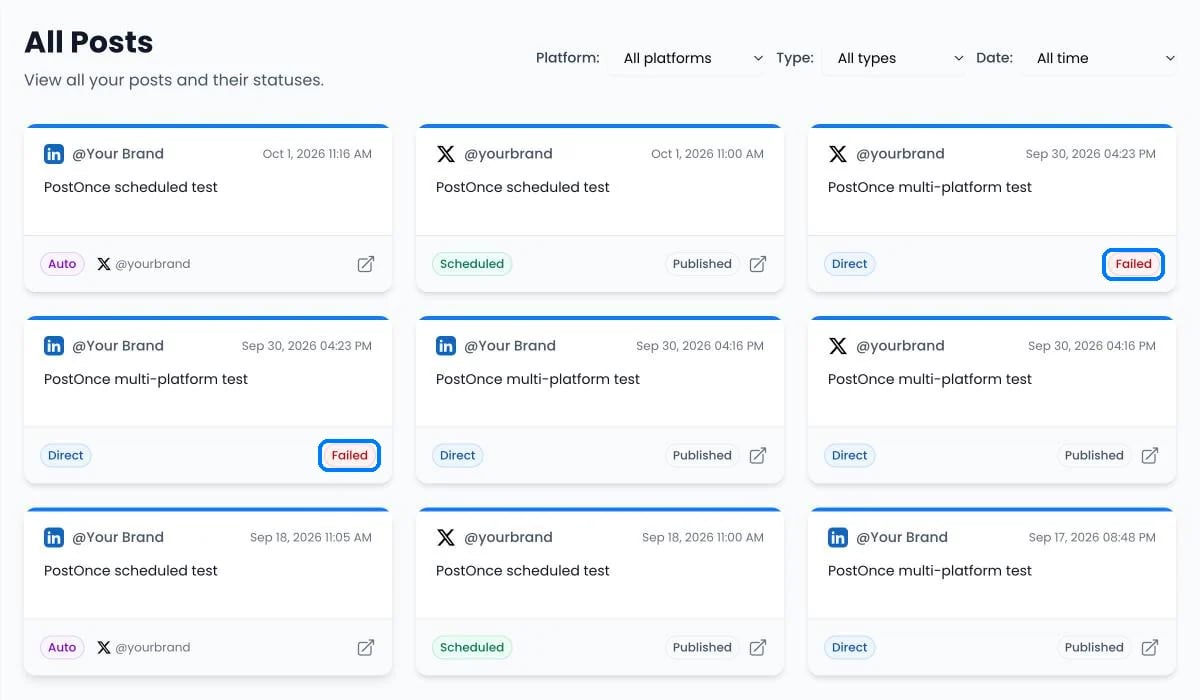
* Open [Posts › Published](https://postonce.to/dashboard/posts/published) and hover over the red **Failed** label to read the message from the platform.
* The posting-result email lists the error for each platform that failed.
 Then look the message up in the guide for that platform. Each guide ends with its errors:
Errors that can happen on any platform are listed [below](#errors-on-any-platform).
## A post failed to publish
1. Find the error message as described above.
2. If it mentions reconnecting, tokens, permissions or authentication, [reconnect the account](/help/reconnect-an-account).
3. If it mentions length, size, duration, aspect ratio or format, change the media to fit the [platform's limits](/help/platform-rules).
4. If it mentions a rate limit, a quota or posting too quickly, wait a few hours and retry. To avoid it, turn on [Set time between posts](/help/publishing-timing#time-between-posts).
5. Look the message up in the platform's error list.
## An account needs reconnecting
See [Reconnect an account](/help/reconnect-an-account). Workflows skip that account until you reconnect it; your other accounts keep publishing.
## A workflow missed a new post
See [Missing or duplicate posts](/help/missing-or-duplicate-posts).
## A post was skipped
PostOnce skips a post on purpose when it can't or shouldn't publish it, and shows the reason on the post. Common reasons:
* The platform doesn't accept that kind of post, such as a text-only post to Instagram or TikTok.
* A keyword filter, the video quality rule or the duplicate check excluded it. See [Filters and duplicates](/help/filters-and-duplicates).
* The original was deleted or made private before PostOnce copied it.
* The destination account needs reconnecting.
To publish a skipped post anyway, click **Add back** or **Allow repeat** on the post.
## It published to some platforms but not others
A workflow post shows **Published** when at least one destination succeeded. Look at the platform icons on the post, or the result email, to see which destinations failed and why. Each platform has its own rules, so a video can be accepted by TikTok and rejected by X.
## The video looks worse, has no sound, or the cover is wrong
See [Video quality, sound and thumbnails](/help/video-quality-and-sound).
## Publishing is paused
| Message | Fix |
| - | - |
| "Your trial has ended." / "You've used all 10 trial posts." | [Choose a plan](https://postonce.to/dashboard/upgrade). Your workflows and queued posts are saved. |
| "We couldn't process your payment." | Update your card under [Billing](/help/billing-and-refunds). |
| "Your plan has ended." | [Choose a plan](https://postonce.to/dashboard/upgrade) to resume. |
When publishing resumes, posts that missed their time appear under **Needs attention** on [Posts › Scheduled](https://postonce.to/dashboard/posts/scheduled). Choose **Reschedule**, **Publish now** or **Delete** for each. Nothing is published all at once without your choice.
## Errors on any platform
Messages are shown exactly as PostOnce displays them. Parts in `{}` change from post to post.
| Error message | What to do |
| - | - |
| "Please reconnect account" | [Reconnect](/help/reconnect-an-account) the destination account, then retry. |
| "Skipped because this account needs to be reconnected. New posts will publish here again once it is reconnected." | Reconnect the account. New posts publish there again automatically. |
| "{platform} supports videos up to {N} seconds. This video is {M} seconds. Please use a shorter video for {platform}." | Use a shorter video for that platform. For TikTok, turn on **Split videos if too long**. |
| "Post timed out before publication started." | Retry the post. |
| "Publication status was unknown after the worker timed out. It was not retried to prevent a duplicate post." | Check the platform. If the post isn't there, retry. |
| "Source media preparation failed after {N} attempts. Media may be unavailable, private, or require reconnecting the source account." | Check the original post is public and reconnect the source account. |
| "Skipped: source content has no text or media to publish." | The source post was empty or its media couldn't be read. |
| "Skipped: the original was deleted or made private." | Make the original public again, then click **Add back**. |
| "Skipped: possible duplicate video." | Intentional. Click **Allow repeat** to publish it anyway. |
| "Stories need one image or video; this post has no media." / "Stories hold one image or video; carousels can't be posted as a Story." / "Story videos can be at most 60 seconds; this one is {N} seconds." | **Post everything as Stories** is on for this destination. Use one image or a video under 60 seconds, or turn the setting off. |
| "{platform} is temporarily limiting publishing. This post was not retried automatically." | The platform asked PostOnce to slow down. Retry in an hour. |
| "Publishing paused while payment or an active plan is required" | See [Publishing is paused](#publishing-is-paused). |
| "The original scheduled time passed while publishing was paused" | Reschedule the post under **Needs attention**. |
| "Please reconnect your source {platform} account before this scheduled post can be published." | Reconnect the workflow's source account. |
| "You have reached the maximum number of connected accounts for your plan." | Remove an account or [change your plan](/help/plans-and-billing#change-your-plan). |
| "Connection was cancelled before the account was connected." | Start again and finish the approval on the platform's screen. |
| "Permissions missing. Please try again and allow all access." | Connect again and leave every permission switched on. |
| "Connection expired. Please try again." | Start the connection again without waiting too long on the platform's screen. |
## Get emails when a post fails
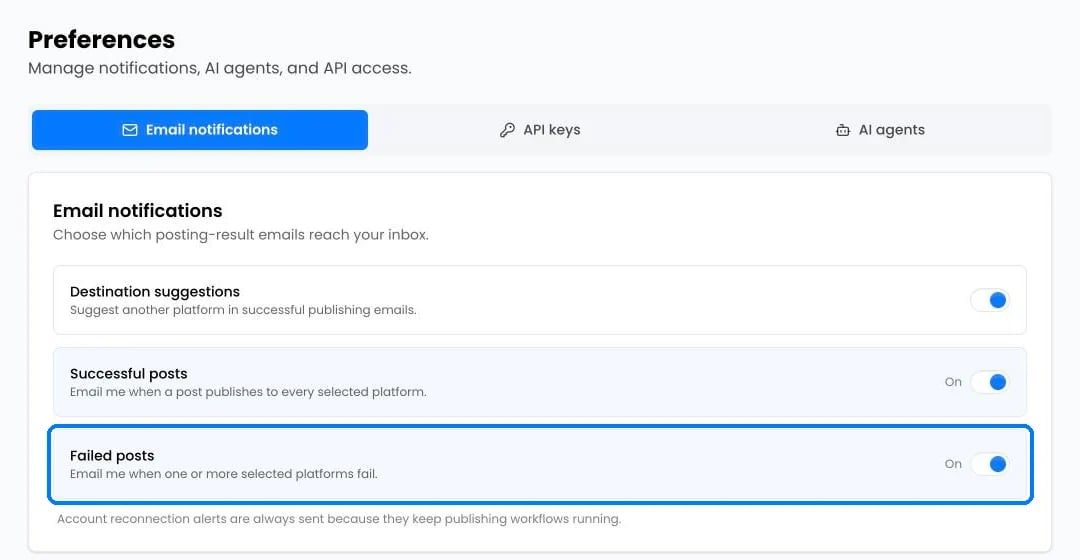
In [Settings](https://postonce.to/dashboard/preferences), keep **Failed posts** on to get an email whenever a platform rejects a post. Reconnection alerts are always sent.
Then look the message up in the guide for that platform. Each guide ends with its errors:
Errors that can happen on any platform are listed [below](#errors-on-any-platform).
## A post failed to publish
1. Find the error message as described above.
2. If it mentions reconnecting, tokens, permissions or authentication, [reconnect the account](/help/reconnect-an-account).
3. If it mentions length, size, duration, aspect ratio or format, change the media to fit the [platform's limits](/help/platform-rules).
4. If it mentions a rate limit, a quota or posting too quickly, wait a few hours and retry. To avoid it, turn on [Set time between posts](/help/publishing-timing#time-between-posts).
5. Look the message up in the platform's error list.
## An account needs reconnecting
See [Reconnect an account](/help/reconnect-an-account). Workflows skip that account until you reconnect it; your other accounts keep publishing.
## A workflow missed a new post
See [Missing or duplicate posts](/help/missing-or-duplicate-posts).
## A post was skipped
PostOnce skips a post on purpose when it can't or shouldn't publish it, and shows the reason on the post. Common reasons:
* The platform doesn't accept that kind of post, such as a text-only post to Instagram or TikTok.
* A keyword filter, the video quality rule or the duplicate check excluded it. See [Filters and duplicates](/help/filters-and-duplicates).
* The original was deleted or made private before PostOnce copied it.
* The destination account needs reconnecting.
To publish a skipped post anyway, click **Add back** or **Allow repeat** on the post.
## It published to some platforms but not others
A workflow post shows **Published** when at least one destination succeeded. Look at the platform icons on the post, or the result email, to see which destinations failed and why. Each platform has its own rules, so a video can be accepted by TikTok and rejected by X.
## The video looks worse, has no sound, or the cover is wrong
See [Video quality, sound and thumbnails](/help/video-quality-and-sound).
## Publishing is paused
| Message | Fix |
| - | - |
| "Your trial has ended." / "You've used all 10 trial posts." | [Choose a plan](https://postonce.to/dashboard/upgrade). Your workflows and queued posts are saved. |
| "We couldn't process your payment." | Update your card under [Billing](/help/billing-and-refunds). |
| "Your plan has ended." | [Choose a plan](https://postonce.to/dashboard/upgrade) to resume. |
When publishing resumes, posts that missed their time appear under **Needs attention** on [Posts › Scheduled](https://postonce.to/dashboard/posts/scheduled). Choose **Reschedule**, **Publish now** or **Delete** for each. Nothing is published all at once without your choice.
## Errors on any platform
Messages are shown exactly as PostOnce displays them. Parts in `{}` change from post to post.
| Error message | What to do |
| - | - |
| "Please reconnect account" | [Reconnect](/help/reconnect-an-account) the destination account, then retry. |
| "Skipped because this account needs to be reconnected. New posts will publish here again once it is reconnected." | Reconnect the account. New posts publish there again automatically. |
| "{platform} supports videos up to {N} seconds. This video is {M} seconds. Please use a shorter video for {platform}." | Use a shorter video for that platform. For TikTok, turn on **Split videos if too long**. |
| "Post timed out before publication started." | Retry the post. |
| "Publication status was unknown after the worker timed out. It was not retried to prevent a duplicate post." | Check the platform. If the post isn't there, retry. |
| "Source media preparation failed after {N} attempts. Media may be unavailable, private, or require reconnecting the source account." | Check the original post is public and reconnect the source account. |
| "Skipped: source content has no text or media to publish." | The source post was empty or its media couldn't be read. |
| "Skipped: the original was deleted or made private." | Make the original public again, then click **Add back**. |
| "Skipped: possible duplicate video." | Intentional. Click **Allow repeat** to publish it anyway. |
| "Stories need one image or video; this post has no media." / "Stories hold one image or video; carousels can't be posted as a Story." / "Story videos can be at most 60 seconds; this one is {N} seconds." | **Post everything as Stories** is on for this destination. Use one image or a video under 60 seconds, or turn the setting off. |
| "{platform} is temporarily limiting publishing. This post was not retried automatically." | The platform asked PostOnce to slow down. Retry in an hour. |
| "Publishing paused while payment or an active plan is required" | See [Publishing is paused](#publishing-is-paused). |
| "The original scheduled time passed while publishing was paused" | Reschedule the post under **Needs attention**. |
| "Please reconnect your source {platform} account before this scheduled post can be published." | Reconnect the workflow's source account. |
| "You have reached the maximum number of connected accounts for your plan." | Remove an account or [change your plan](/help/plans-and-billing#change-your-plan). |
| "Connection was cancelled before the account was connected." | Start again and finish the approval on the platform's screen. |
| "Permissions missing. Please try again and allow all access." | Connect again and leave every permission switched on. |
| "Connection expired. Please try again." | Start the connection again without waiting too long on the platform's screen. |
## Get emails when a post fails
In [Settings](https://postonce.to/dashboard/preferences), keep **Failed posts** on to get an email whenever a platform rejects a post. Reconnection alerts are always sent.
 ## Still stuck?
Search this help center with ⌘ K, or email [support@postonce.to](mailto:support@postonce.to) from the address you use for PostOnce. Include the platform, the approximate time, and the exact message you saw. Never send passwords, access tokens, API keys, or card details.
Something missing from PostOnce? [Request a feature](https://postonce.featurebase.app/) or check the [roadmap](https://postonce.featurebase.app/roadmap).
This documentation is built and hosted on [Mintlify](https://mintlify.com), a developer documentation platform.
## Still stuck?
Search this help center with ⌘ K, or email [support@postonce.to](mailto:support@postonce.to) from the address you use for PostOnce. Include the platform, the approximate time, and the exact message you saw. Never send passwords, access tokens, API keys, or card details.
Something missing from PostOnce? [Request a feature](https://postonce.featurebase.app/) or check the [roadmap](https://postonce.featurebase.app/roadmap).
This documentation is built and hosted on [Mintlify](https://mintlify.com), a developer documentation platform.