
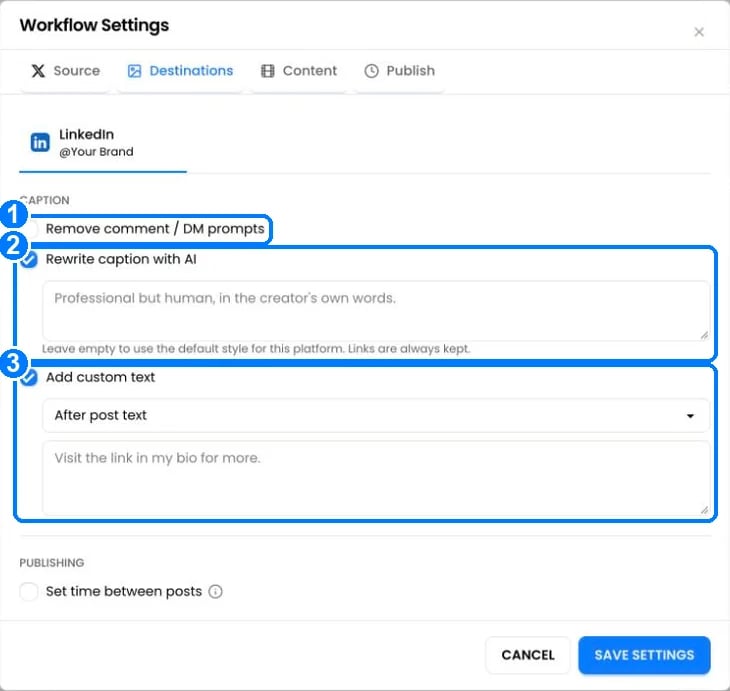
- Remove comment / DM prompts removes lines like “Comment GUIDE and I’ll DM you the link”, which don’t work on other platforms.
- Rewrite caption with AI rewrites the caption in the style of the destination platform. Type your own instructions (up to 1,000 characters), or leave the box empty to use the platform’s default style. Links, @mentions and disclosure tags like #ad are always kept, and so are blank lines between paragraphs.
- Add custom text adds text before or after every caption, such as “Full video on YouTube”. If the caption gets too long for the platform, the original caption is shortened and your text is kept.
What the AI rewrite does on each platform
Hashtags from other platforms like #fyp, #reels and #shorts are removed.
Other caption settings
- Remove @mentions from captions (Instagram): removes the @ from usernames so other accounts aren’t tagged.
- Threads caption length: 160, 280 or 500 characters. Shortened at a paragraph break or whole word.
- In Create Post, tick Platform captions to write a different caption for each account.
How captions are handled
- Line breaks are kept on every platform. On TikTok, PostOnce keeps blank lines between paragraphs, which TikTok normally removes.
- Too long? Captions are cut at the platform’s limit. See Platforms at a glance.
- Hashtags: Instagram keeps the first 30 and TikTok the first 5.
- Links: clickable on Facebook, LinkedIn, X, Threads and Bluesky. Not clickable in Instagram and TikTok captions. On X, only one post per day keeps a clickable link (see X).
- @mentions: LinkedIn posts them as plain text. Bluesky links them when the handle exists.