
Connect TikTok

TikTok as a source
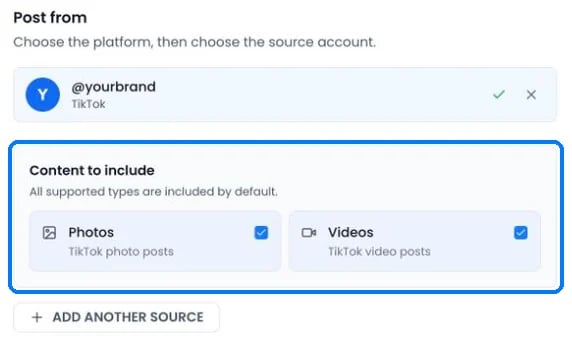
A TikTok source can copy photo posts, videos, or both
- Photos (photo posts and carousels) and Videos are both included by default.
- PostOnce checks TikTok for new posts every 10 minutes.
- The account and the post must be public. If a TikTok source account is made private, PostOnce pauses the workflow and keeps the queued posts until you make it public again and click Resume workflow.
- Public videos whose sound TikTok muted are still imported.
Publishing to TikTok
Limits
TikTok blocks accounts that post too often through apps, so PostOnce keeps each TikTok account under 14 posts in any 24 hours. If a workflow brings more than that, posts queue up and publish later. Turn on Set time between posts to spread them out evenly. Posts you publish in the TikTok app don’t count toward PostOnce’s limit, but they count toward TikTok’s.
Line breaks and blank lines between paragraphs are kept.
TikTok options when you create a post
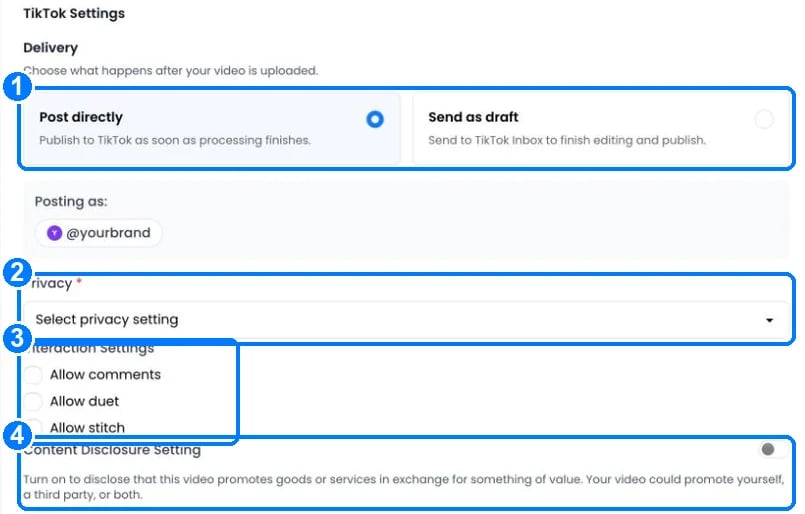
TikTok options in Create Post
- Delivery: Post directly publishes as soon as processing finishes. Send as draft sends the video to your TikTok inbox so you can add music or effects in the app and publish it there. Drafts only work when TikTok is the only account selected.
- Privacy: Public, Friends, Followers or Private. The choices come from your TikTok account.
- Interaction settings: allow comments, Duet and Stitch. Duet and Stitch aren’t available for photo posts.
- Content Disclosure Setting: turn on when the post promotes goods or services. Choose Your brand (“Promotional content”) or Branded content (“Paid partnership”). Branded content can’t be private.
TikTok settings in a workflow
Under Settings › Destinations for a TikTok account:- Split videos if too long divides longer videos into the fewest equal parts and publishes them in order. A 24-minute video becomes three 8-minute parts.
- Keep thumbnail consistent on TikTok (on by default) uses the source video’s thumbnail as the TikTok cover.
- The caption options work as described in Captions for each platform.
What TikTok doesn’t allow
- Trending sounds, effects and stickers can’t be added through TikTok’s API. Use Send as draft and add them in the TikTok app.
- Text-only posts can’t be published.
- Private accounts and private posts can’t be used as a source.