
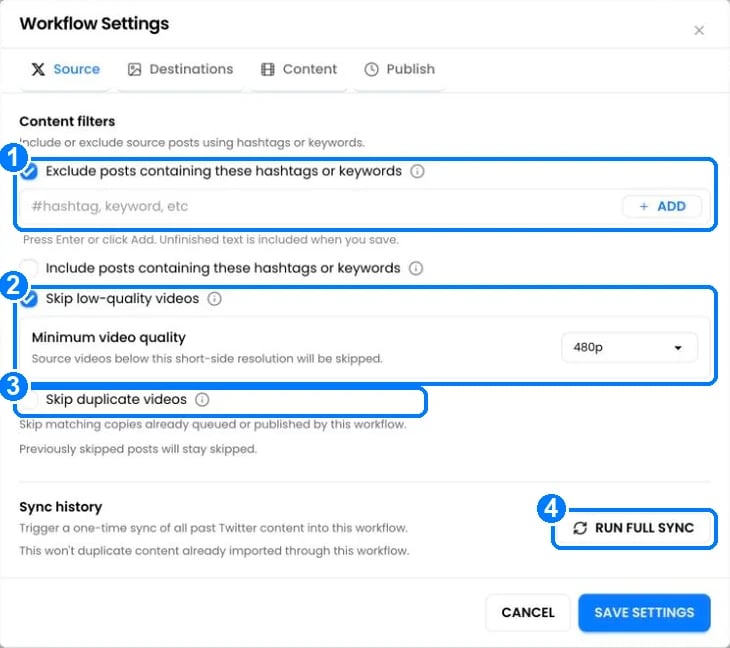
- Exclude or include posts containing these hashtags or keywords: type a word or hashtag and click Add. Example: exclude
#personal, or include only#podcast. - Skip low-quality videos: skips Instagram videos below the Minimum video quality you choose (360p, 480p, 720p or 1080p). Useful when reposting old Instagram videos, which Instagram often stores at low quality.
- Skip duplicate videos: skips a video that this workflow already queued or published. It matches by caption and video length, and keeps the best-quality copy when it can. Posts you scheduled yourself are never skipped.
- Run full sync: imports all past posts from the source that the workflow hasn’t seen. Nothing is imported twice.
Content types
The Content to include options choose which kinds of posts are copied. Defaults:
Change them when you create the workflow, or under Settings › Source.
Skipped posts
A skipped post shows the reason in the workflow, for example “Skipped: possible duplicate video.” or “Skipped: Instagram quality is 360p. Requires 480p+.” To publish it anyway, click Add back or Allow repeat on the post. PostOnce also skips posts automatically when:- The destination can’t accept them, like a text-only post to Instagram.
- The original was deleted or made private before it was copied.
- PostOnce published the post itself, so it’s never copied back to where it came from.
Questions
Why was a post skipped as a duplicate when it isn't one?
Why was a post skipped as a duplicate when it isn't one?
Two videos with the same first 8 words of caption and almost the same length are treated as copies. Click Allow repeat on the post, or turn off Skip duplicate videos.
Does Skip low-quality videos work for every source?
Does Skip low-quality videos work for every source?
It checks Instagram source videos. Other platforms are always downloaded at the best quality available.