PostOnce can publish to your LinkedIn profile or Company Pages, and copy posts from Company Pages to other platforms.

Connect LinkedIn

The LinkedIn row on the Accounts page with the Connect LinkedIn button
On Accounts, click Connect LinkedIn. PostOnce asks what you want to connect:
  • Personal profile: can receive posts (destination only).
  • Company Pages: can receive posts and be a workflow source. You need an admin or content admin role on the Page. Choose the Pages under Select Company Pages; each Page counts as one account on your plan.
Personal LinkedIn connections expire after a while. PostOnce emails you 7 days before so you can reconnect without missing posts.

LinkedIn as a source

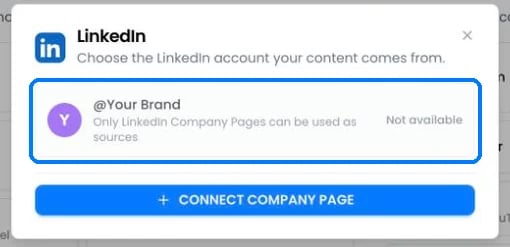
The LinkedIn source picker showing a personal profile marked Not available and a Connect Company Page button

Only Company Pages can be a workflow source

  • Only Company Pages can be a source. A personal profile shows “Not available”.
  • PostOnce checks LinkedIn for new posts every 15 minutes.
  • Reshares, polls, celebrations and document posts are skipped. Article posts are copied as the text plus the article link.

Publishing to LinkedIn

Images and video can’t be mixed in one post. Posts are always public. Hashtags stay clickable; @mentions are posted as plain text because LinkedIn’s API can’t tag people from text.

LinkedIn errors

Still stuck?

Search this help center with ⌘ K, or email support@postonce.to from the address you use for PostOnce. Include the platform, the approximate time, and the exact message you saw. Never send passwords, access tokens, API keys, or card details. Something missing from PostOnce? Request a feature or check the roadmap.
Last modified on October 7, 2026